



In today's streaming-first world, saving videos from YouTube, TikTok, or Bilibili often requires a third-party tool. If you search for “YouTube Downloader” on Google, Y2Mate usually appears near the top of the results.
As a long-running online downloader, Y2Mate has gained a large user base thanks to two key features: it's free and requires no installation. However, as the web environment changes and users become more security-conscious, many people are asking the same questions:
Is Y2Mate still safe in 2026? And is it still a good choice today?
This review takes a close look at Y2Mate's current performance, pros and cons, and safety risks. We also compare it with more stable alternatives to help you decide whether Y2Mate is still worth using.

Introduction to Y2Mate
Y2Mate is a web-based video downloader best known for converting YouTube videos into MP3 audio or MP4 video files. Its popularity stems from simplicity: It does not require an account or browser extensions. A web browser is all you need.
Despite ongoing copyright pressure and frequent domain changes (.com, .is, .io, and others), Y2Mate has survived for years. It remains popular among light users who want a quick and free way to download videos for offline use.
Pros and Cons of Y2Mate
To keep this review objective, we tested Y2Mate on both Chrome and Edge browsers. Here's what we found.

-
 Free to use: No hidden fees or paid features.
 - Cross-platform: Works on Windows, macOS, Android, and iPhone, as long as you have a browser.
- Common format support: Supports common formats like MP3, MP4, M4V, 3GP, WMV, and FLV.
- No account required: Anonymous use with basic privacy protection.

-
 Heavy advertising: Clicking "Download" triggers pop-up ads 100% of the time, often redirecting to gambling sites, adult content, or fake software downloads.
 - Video quality issues: Despite claiming HD support, 1080P downloads often fail. Some files download without audio or return server errors.
- No batch or playlist downloads: Downloading a playlist of 50 videos requires manually copying and pasting links 50 times.
- Unstable servers: Download speed depends on server load. During peak hours, downloads are slow and parsing often fails.
How to Use Y2mate
For occasional downloads, the process is still fairly simple:
- Step 1: Open video website and copy the URL of the video you want.
- Step 2: Visit the Y2mate website, paste the link into the search box, and click the arrow to parse the video.
- Step 3: Choose a resolution (e.g., 1080p) or audio format (e.g., .mp3) from the list.
- Step 4: Click "Download." Warning: This usually opens a pop-up ad tab. Close it immediately.
- Step 5: Simply wait for the download to finish. Do not click anywhere on the pop-up window, as any interaction will redirect you to an ad page.


Is Y2Mate Safe and Reliable?
The short answer: The website itself isn't a virus, but using it is risky.

Y2Mate relies on aggressive ad networks. A single wrong click can redirect you to phishing pages or prompt fake “Flash updates” or “system cleaners,” which are often malware or bloatware.
- Privacy risks: Many redirect pages request browser notification permissions. Once enabled, spam ads would appear constantly on your desktop.
- Low reliability: Due to copyright enforcement, Y2Mate is frequently blocked by ISPs in the US, UK, and other regions. Access can disappear without warning.
- Data tracking: As an online service, your IP address and download behavior will be tracked by third-party advertisers.
If you are tired of navigating these risks, or want better quality and speed, a professional alternative is worth considering.
Better Alternative: EasyDown Video Downloader
For users who value safety, speed, and video quality, a professional desktop downloader is the best choice. We recommend iFoneTool EasyDown, software designed specifically to solve the problems found in online tools.
Unlike Y2mate, EasyDown is installed locally. It supports downloading from 1000+ sites (including YouTube, TikTok, Instagram, and Twitch), uses GPU acceleration for speed, and completely blocks malicious ads.
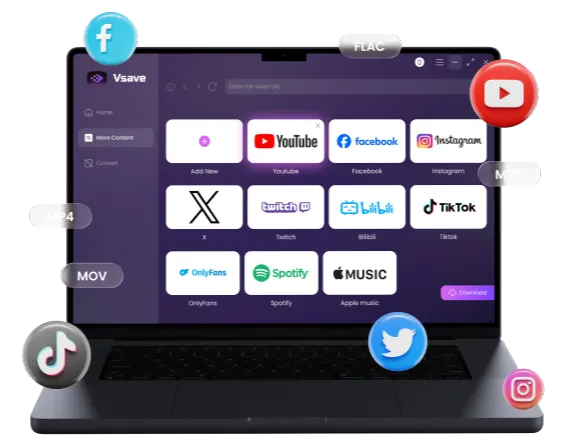
The best Y2Mate alternative to download videos and music in 4K, 8K, and 320kbps without ads. Safe, fast, and stable.
 Free Download
 See the comparison with Y2mate free online downloaders
| Feature | Y2Mate (Online) | iFoneTool EasyDown |
|---|---|---|
| Safety | ⚠️ Low (malicious ads) | ✅ High (100% Ad-free/Clean) |
| Max Resolution | 1080p (often compressed) | ✅ 1080p / 4K / 8K |
| Batch Downloads | ❌ Not supported | ✅ Full playlist & channel |
| Audio Quality | Standard (128kbps) | ✅ Up to 320kbps |
| Speed | Slow, server-limited | ⚡ Fast, local acceleration |
| Stability | Poor | ✅ High (Regular Updates) |
Y2Mate often leave you with messy files like "audio_01.mp3" or videos without context. EasyDown also handles the details for you:
- Organize Music Instantly (ID3 Tags): No more "Unknown Artist." EasyDown automatically retains the original cover art, title, album, and artist info. Your music library stays professional and perfectly sorted without manual editing.
- Auto-Download Subtitles: Watching foreign content or music videos? EasyDown can extract subtitles (CC) and lyrics along with the video, so you never miss a word.
Based on our real-world testing, the answer is clear. While Y2mate offers quick convenience, its poor security and unstable performance make it a burden for downloading videos. It is simply not worth the gamble. Instead of risking potential malware, we strongly recommend switching to a safer, more stable, and frequently updated alternative like EasyDown.
How iFoneTool EasyDown Works
Step 1: Install and launch
Download and install iFoneTool EasyDown on your PC (Windows/Mac supported).
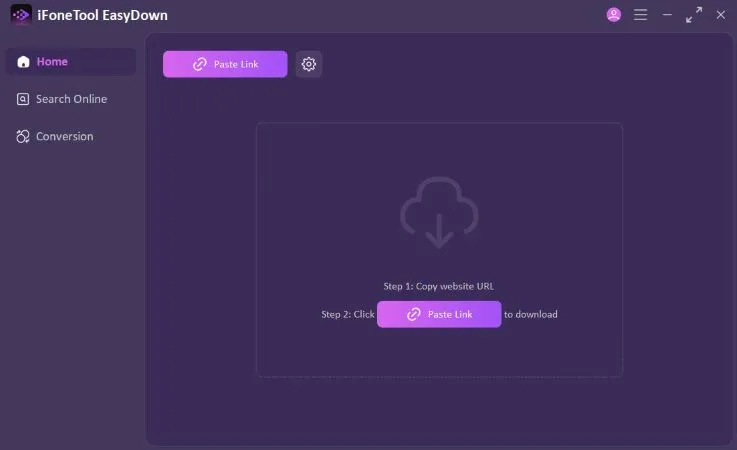
Step 2: Paste the link
Copy a video or playlist link. Click the "Paste Link" button in EasyDown. It automatically detects resolutions (up to 8K) and audio options.
Step 3: Choose output
Choose your desired format (e.g., 1080p Video or MP3 Audio).

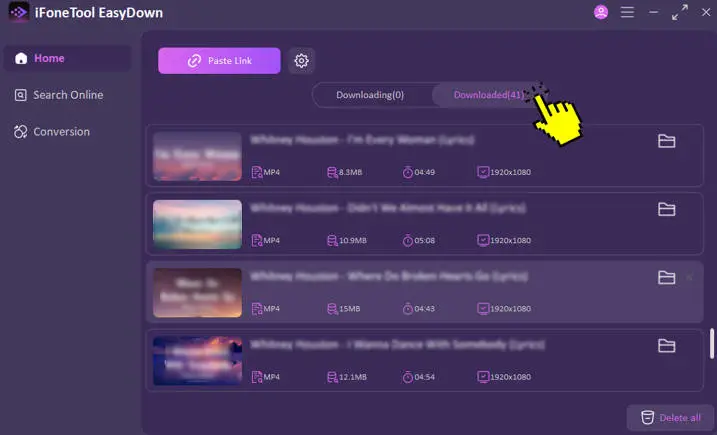
Step 4: Download
Click Download. The software handles the task instantly. You can go to the Home tab and open the Downloaded section to find your video saved in 1080p MP4 or other.

🎁 Want EasyDown Pro for Free?
If you think the trial isn't enough, join the EasyDown Review Campaign! Just share your honest review, post, or video about EasyDown on your favorite platform. You can earn a free license code or even a $50 Amazon Gift Card.
👉 Click here to view campaign details and submit your review
FAQ
Why is Y2mate frequently banned?
Y2mate is often targeted by the RIAA and Google due to copyright issues. This leads to it being removed from search results or blocked by ISPs in regions like the US and UK.
What is the safest YouTube audio downloader?
The safest option is a desktop client like iFoneTool EasyDown. Desktop software doesn't rely on browser pop-ups for revenue, contains no malicious redirect code, and is verified by antivirus software.
Do I need an account to use Y2Mate?
No, Y2mate is an anonymous service. However, this means you cannot save download history or create personal playlists.
Is Y2mate better than other downloaders?
Only if you strictly prioritize "no installation" for a one-time download. In terms of safety, speed, quality, and batch capabilities, it falls far behind professional software like EasyDown.

In summary, Y2Mate works as a quick, short-term solution for users who download videos once or twice a year and don't mind closing endless ads.
For creators, music lovers, or anyone concerned about security, iFoneTool EasyDown is the better choice. It replaces risky ads with a clean, fast, and reliable download experience.
Ready to stop dealing with pop-ups? Try EasyDown and experience real download speed.
 Get Pro License