



Vidmate is a popular multimedia download tool that allows users to download videos, movies, and audio files from major video hosting sites, making it the go-to choice for many. However, does Vidmate live up to the claims made in its advertisements? What are its installation process, security, and features like? In this article, we will provide a detailed review of Vidmate and compare it with similar download tools to help you decide if it's worth trying.

What is Vidmate?
Vidmate is a multimedia downloading tool with an intuitive interface designed for Android devices. Once you download the Vidmate app, you can instantly download movies, TV shows, and videos from YouTube, as well as content from numerous other video hosting services and social networks including Vimeo, TikTok, Instagram, and Twitter.


 Android users who download videos from multiple platforms
- People who want streaming-style browsing (similar to TikTok)
- Users comfortable with APK installations

 iOS/iPhone users (no official version available)
- Windows/Mac users seeking desktop software
- Users prioritizing privacy and security
How to Download Vidmate App -- Complete Installation Guide

Through extensive testing, I discovered that Vidmate is only compatible with Android systems. Despite finding listings for iOS in the Apple Store and Windows versions online, these either aren't the same app or simply won't work, they're just APK files meant for Android.
How to Download Vidmate APK (The Only Method That Works)

The installation packages you find through Google search won't work. You MUST download the APK by scanning the QR code on their official website using your phone.
- Visit the official Vidmate website on your phone
- Scan the QR code provided on their homepage.
- Enable "Install from Unknown Sources" in your phone settings.
- Complete the APK installation.
- Launch the app (see troubleshooting below).
Troubleshooting: Can't Open Vidmate?

If you can't open Vidmate by clicking the icon, wait for a trending video notification in your bar and tap it to launch the app. This bypasses the "Not available in current area" error.
If you find the installation process too complicated and want to quickly download lossless YouTube videos or songs, try this simple-to-use alternative:
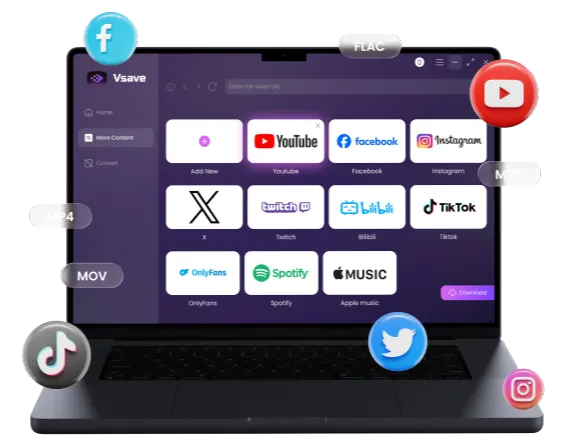
With just a single click, you can effortlessly download videos and music from YouTube and 1,000+ other platforms, such as TikTok, Instagram, Spotify, Apple Music, and Facebook.
 Free Download
 Free Download
Vidmate Review: Real User Experience - Pros and Cons
After using Vidmate extensively for my daily content, I wanted to provide an honest assessment. While I recently encountered an issue that perfectly captures the app's current state.
Like many users (including those on devices like the Pixel 7), I found that adverts now crash the experience at least 1/3 of the time.
You'll see the "X" or close button, but the advertising simply won't close. The only workaround: Force-close the entire app, restart it, and pray it works the second time. A massive waste of time if you just want to grab a quick MP3.
Here is the detailed breakdown of my hands-on testing of Vidmate:
- Streamlined Discovery: The video feed mimics TikTok's format, making content discovery fun and easy within the app.
- Pre-Download Customization: You can rename files and adjust download paths for better organization (though you need to reconfigure this for each file).
- Multi-Platform Support: Vidmate supports various social media platforms, not just video sites.
- Critical Failure: YouTube Downloads Don't Work. Despite the marketing claims, the download functionality consistently fails for YouTube - the very platform most users need.
- Vague Quality Options: Instead of professional bitrate indicators (like 320kbps), you are met with vague file size estimates (e.g., MP3: 549KB). You never truly know the audio quality until after you've wasted your data.
- Slow Parsing: The "analysis" phase takes an eternity, often hanging indefinitely on simple links.
- No Lossless Support: Vidmate only offers basic, compressed formats, with no FLAC or high-fidelity options.
- Lack of Guidance: No tutorials or a simple "copy-paste link" feature, making the app confusing for new users.
If you're tired of fake downloads and frustrating ads, EasyDown offers a clean, ad-free environment. Whether it's downloading YouTube 4K videos in lossless quality or YouTube Music, it only takes one click to get it done. Click the button below to try it for free.
Is Vidmate Safe to Install?
Based on my testing and user reports, there are several key factors you should consider regarding the safety and privacy of this app before proceeding with the installation.
Security Risks
- APK installation from unofficial sources increases malware risk
- Requires enabling "Unknown Sources" which lowers device security
- Intrusive ads that crash the app experience
- Limited transparency about data collection
Privacy Issues: Beyond security, the app's data handling practices are somewhat opaque. I found limited transparency regarding data collection, a lack of an easily accessible privacy policy, and potential tracking through various ad networks integrated into the platform.
Legal Considerations
Important Notice: It is crucial to remember that downloading copyrighted content from YouTube or social media platforms without permission may violate their Terms of Service and local copyright laws. I recommend using Vidmate (or any downloader) only for content that is explicitly marked for download or that you have the legal right to use.
Vidmate App vs Online Tool
If you've searched for "Vidmate" on Google, you may have noticed there's an online version (youtdownloader.com) in addition to the Android app.
| Feature | Vidmate Android App | Vidmate Online Tool |
|---|---|---|
| Runs Locally | Yes | No |
| Data Sent to Servers | Limited | Yes |
| User Privacy | Limited | Limited |
| Tracking Risk | High | Higher |
| Ease of Use | Very Difficult | Simple |
| Cost | Free (with ads) | Free |
| Parsing Speed | Slow | Fast |
| Download Speed | Relatively Fast | Slow |
| Format Options | MP3, MP4 | MP3 (48-256kbps), MP4 (144P-2160P) |
My Suggestion
- For privacy-conscious users: Neither option is ideal, but the Android app gives you slightly more control
- For convenience: The online tool is simpler but sacrifices privacy
- For serious downloaders: Skip both, see the alternative below
Top Vidmate Alternative for Video Download 🔥🔥
Both Vidmate and the Vidmate online tool have advantages, but neither is the ideal choice for all users. Some users want the simplicity of an online downloader with complete functionality, clearly Vidmate doesn't meet these requirements. Additionally, the potential security risks of Vidmate APK files cannot be ignored.
This is where a more advanced alternative comes in: EasyDown Video Downloader .
With just a single click, you can effortlessly download videos and music from YouTube and 1,000+ other platforms, such as TikTok, Instagram, Spotify, Apple Music, and Facebook.
Free Download Free Download As a well-designed downloader, EasyDown Video Downloader is also incredibly powerful. You can easily export songs, albums, playlists, podcasts, audiobooks, and radio shows from YouTube in formats like MP3, AAC, WAV, FLAC, AIFF, or ALAC.
-
All-in-One Solution: Supports 1000+ sites with 4K/320kbps quality.
-
Format Flexibility: Convert to MP3, AAC, WAV, FLAC, AIFF, or ALAC.
-
Batch Download: Download entire playlists or channels in one click.
-
ID3 Tags & Lyrics: Retains metadata while maintaining lossless audio quality
How to Use EasyDown
- Step 1
Download and install EasyDown by clicking the button below. - Step 2
Log in to your YouTube account using EasyDown's built-in browser. When you find something you like, simply click the download button and select your preferred MP3 format in the pop-up window. Done! - Step 3
You can easily find your downloaded content in the "Downloaded" list under the Home tab. Simple as that!


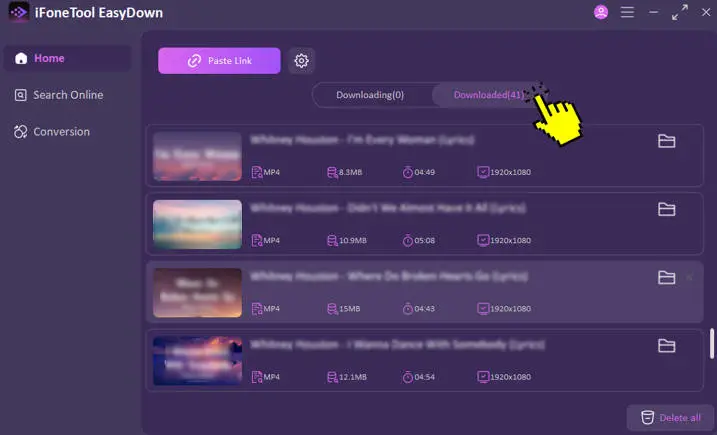
The entire process takes less than a minute, even for playlists with dozens of videos. This is the convenience that Vidmate simply can't match, Give it a try yourself and see the difference!
FAQs About Vidmate
Is Vidmate free and safe?
Vidmate is free, but the requirement for APK installation and unofficial sources increases malware risks. The ad system often causes app crashes.
What formats and quality does Vidmate support?
Vidmate's format support is quite limited:
Audio: MP3 only(no clear quality indicator);
Video: MP4(no clear quality indicator);
No lossless formats like FLAC are supported;
Quality indicators are often missing or unreliable
Does Vidmate work on iPhone/iOS?
No. Despite some listings in the App Store, there is no official Vidmate version for iOS. Any apps claiming to be Vidmate on iOS are either unrelated apps or scams.
Is Vidmate an HD video downloader?
While Vidmate claims to support HD downloads, actual testing shows very limited quality options and unreliable download functionality, especially for YouTube. The maximum video quality is unclear and often disappointing.

While Vidmate may work for basic downloads on Android devices, its complicated installation, security concerns, and intrusive ads make it hard to recommend in 2026. EasyDown Video Downloader is absolutely worth trying for a safer, more powerful experience.
 Buy Now