



Have you tried various online converters, but found they either don't work properly or contain malware? Finding a reliable Mac free YouTube to MP3 converter desktop tool can be frustrating.
If you need a solution that is safe, supports high bitrate (320kbps), outputs without loss of audio quality, and allows batch downloading, then dedicated YouTube to MP3 Mac software is your best choice.
Then you have come to the right place! This article tests and filters the best YouTube to MP3 converter for Mac options (both free and paid), helping you easily build an offline music library on macOS. Let's take a look.

EasyDown - Best YouTube to MP3 Converter for Mac
The first tool we will introduce for converting YouTube music to MP3 format is iFoneTool EasyDown Video Converter. This is a desktop program that can be used on Windows and Mac computers.
It can help users convert and download YouTube Music, Videos and playlists to MP3, AAC, WAV, FLAC, AIFF, or ALAC format with original audio quality. It can not only convert at up to 10X speeds but also preserve ID3 tags including Title, Album, Artist, etc.
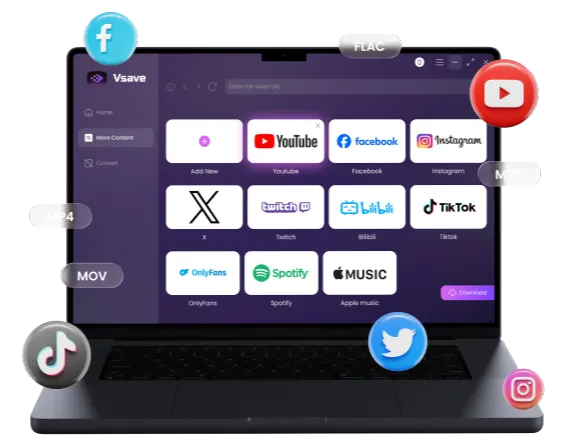
EasyDown Converter can help you download and convert all YouTube Videos, Music, and playlists to MP3 on your local computer for offline listening.
 Free Download
 Free Download
-
Download YouTube videos/songs/short videos/playlists.
-
Convert YouTube Music songs to MP3/AAC/WAV/FLAC/AIFF/ALAC.
-
10X faster speed & keep the lossless sound quality.
-
Keep ID3 tags, including Title, Album, Artist, etc.
How to Convert a YouTube Video to MP3 on Mac with EasyDown
Step 1: Launch and Search
We will take a Mac computer as an example to demonstrate how to convert youtube video to mp3 on mac. First, please click the "Download" button below to download EasyDown Converter and launch it.
After clicking the Search Online Tab, you will see the interface below. You can click "YouTube" to open the YouTube web player for conversion.

Step 2: Customize Output Settings
Click the 'Settings' button at the top of the Home tab to customize your settings. Select 'MP3' as the output format. You can also adjust other settings, such as subtitle language and output location.

Step 3: One-Click Download
Now, please return to the YouTube web player or YouTube app, select your favorite song or album, and click the red "Download" button. EasyDown will automatically download the song for you. Wait a moment, and the music will be downloaded in MP3 format.


If you need to transfer MP3s to Music, please click here to jump to our Bonus Tips section.
4K Video Downloader
4K Video Downloader enjoys a high reputation in the industry. Although its name emphasizes "Video", its "audio extraction" function is equally robust. It allows users to download entire channels or playlists from YouTube, which is perfect for fans following creators.
How to Use:
- Download and install 4K Video Downloader on your Mac.
- Copy the YouTube video link you want to download in your browser.
- Click the "Paste Link" button in the upper left corner of the software.
- In the pop-up window, select "Extract Audio" and "MP3" format.
- Click the "Extract" button and wait for the download to complete.


-
 Supports downloading entire YouTube playlists and channels.
-
Supports extracting subtitles from YouTube videos.

-
 The free version limits the number of downloads to 30 per day.
-
The free version cannot download long playlists with subtitles.
MediaHuman
If you are looking for a pure free youtube to mp3 converter for mac os x, MediaHuman is a veteran and trustworthy choice. MediaHuman was once the most highly recommended audio extraction tool by Mac users because it supports automatically adding downloaded audio to the iTunes/Music app, which is very convenient for users in the Apple ecosystem.
How to Use:
- Open MediaHuman YouTube to MP3 Converter.
- Drag and drop the YouTube video URL from the browser to the application window, or click "Paste Link".
- You can add multiple links at once for batch processing.
- Click the download arrow icon in the upper right corner to start the conversion.
- The file will be saved automatically and can optionally be added to your music library.

- Supports batch downloading of playlists or albums.
- Supports automatic import to iTunes/Music App.
- Includes a tag editor to modify cover art and metadata.
- The user interface looks outdated.
- The download acceleration feature named "Turbo Boost" requires payment.
MacX Video Converter Pro (AI)
MacX Video Converter Pro is a comprehensive multimedia tool. It is not just a youtube to mp3 converter for mac, but also integrates video conversion, compression, screen recording, and even AI image enhancement functions. For creators who need to convert a youtube video to mp3 on mac and may need subsequent audio or video editing, this is an all-in-one software.
How to Use:
- Launch MacX Video Converter Pro and click the "URL" button to enter the download interface.
- Paste the YouTube video link and click "Analyze".
- After the analysis is complete, select the output format, or download the video first.
- If it is a video, drag it into the main interface after downloading, and select "to Music" -> "MP3".
- Click the "RUN" button to start processing.

- Fast conversion speed.
- Rich features: includes editing, merging, compression, and AI enhancement.
- Overkill and complex for simple MP3 needs.
- Paid software with limited free trial.
4K YouTube to MP3
The free "Starter" version only allows downloading 15 single files per day. More fatally, for Playlist and Channel downloads, the free version can only extract the first 10 tracks.
How to Use:
- Run 4K YouTube to MP3.
- Pre-set the output format to MP3 and the desired quality (such as 320kbps) in "Preferences".
- Copy the YouTube link and click "Paste Link" on the software interface.
- The software will automatically start downloading and converting to MP3 without extra clicks.

- Built-in music player.
- Supports audio extraction from SoundCloud and Facebook.
- Free "Starter" version limited to 15 files/day.
- Single function, cannot handle videos.
YTD Video Downloader for Mac
YTD Video Downloader is a classic mac free youtube to mp3 converter desktop tool; although the interface hasn't changed for many years, the core conversion function remains effective.
How to Use:
- Open YTD Video Downloader for Mac.
- Paste the YouTube URL in the "Download" tab.
- After the software downloads the video, switch to the "Convert" tab.
- Select the file you just downloaded and set the output format to "MPEG Audio Layer 3 (MP3)".
- Click "Convert Video" to complete the conversion.

- Small software size, low resource usage.
- Supports resume capability.
- Free version contains ads.
- Slow download/conversion speeds.
Cisdem Video Converter
Cisdem Video Converter is known for its stability and rarely crashes. As a youtube to mp3 mac software, it supports not only downloading but also an extremely wide range of format conversions. If you need to ensure that downloaded MP3s can play on all devices, Cisdem is a good choice.
How to Use:
- Enter the "Download" section of Cisdem Video Converter.
- Paste the YouTube video address and press Enter.
- After the download is complete, drag the file into the "Convert" section (if it wasn't saved directly as audio).
- In the format list, select "General Audio" -> "MP3 Audio".
- Click the convert icon to export the file.

- Supports batch conversion and file merging.
- Excellent lossless conversion quality.
- Free trial limited to converting half file length.
- Price is relatively high.
Bonus Tip: How to Import MP3 to Mac Music (and Sync to iPhone)
Downloading high-quality MP3s is just the first step. To get the best listening experience in your Apple ecosystem, it is recommended that you import the files into the native macOS "Music" app. This not only organizes cluttered files but also seamlessly syncs them to your iPhone or iPad.
Import to Apple Music (Mac)
This is the simplest management method, making your Mac the music command center.
- Open the "Music" application.
- Open Finder at the same time and locate your download folder.
- Select your downloaded MP3 files and drag and drop them directly into the "Songs" list of the "Music" app.

Perfecting Song Metadata (ID3 Tags)
some downloaders often don't include complete album art or artist information, which makes your playlist look messy.
- In the "Music" app, right-click on the newly imported song and select "Get Info".
- Here, you can manually enter the Artist, Album name, or even drag in a high-definition image as the Cover Art in the "Artwork" tab.


Complete information helps Siri identify and play your songs more accurately. If you use EasyDown for downloading, it will automatically match the complete Artist, Album name, and Cover Art for you, so you can ignore this step.
Two Ways to Sync to iPhone
Once the files are organized, you can listen on your phone in the following ways:
- Method A: Automatic Sync (Recommended) - If you subscribe to Apple Music or iTunes Match and have enabled the "Sync Library" feature, the MP3s you added and organized on your Mac will automatically appear on your iPhone via iCloud, without any extra operations.
- Method B: Manual Sync (via Cable) - If you do not subscribe to Apple Music, connect your iPhone to your Mac using a USB cable. Find your iPhone in the Finder sidebar, switch to the "Music" tab, check "Sync music onto [Your iPhone Name]", and click "Apply".

FAQ
Is there a free YouTube audio downloader for Mac?
Yes, there are many choices. EasyDown and MediaHuman both provide excellent free versions. Additionally, 4K YouTube to MP3 also offers a daily free download quota, which is enough to meet the needs of ordinary users.
How can I download MP3s from YouTube directly?
To download MP3s directly without downloading the video footage, you need to use specialized 'audio extraction' software. We recommend using EasyDown from the list above; simply paste the link, and the software will grab only the audio stream and save it as an MP3 format.
What is the best YouTube converter for Mac?
This depends on your needs. If you pursue speed and ease of use, and need to download entire playlists, EasyDown is the best choice.

Choosing the right YouTube to MP3 downloader software for Mac depends on your specific needs. Whether you prefer the simplicity of MediaHuman or the all-in-one efficiency of EasyDown, these desktop solutions offer a safer alternative to online converters.
We hope this guide helped you learn how to convert a YouTube video to MP3 on Mac effectively. Download EasyDown today and start building your offline library!
You may also like: