



As someone who spends 2 hours commuting every day listening to podcasts, I once searched for 'YouTube to MP3 extensions' on Google, only to end up in a nightmare. The first few pages were filled with outdated tool recommendations—clicking on them revealed extensions that were no longer updated or didn't work at all. To make matters worse, those so-called 'review articles' were just disguised ads, with authors who clearly hadn't tested the tools themselves.
I just wanted a simple answer: which extension actually works, is safe, and is easy to use? After finding no reliable options, I decided to test it myself. Over the past 3 months, I tested all the YouTube to MP3 Chrome extensions that claimed to be 'still working'—from installation to usage, sound quality, security, and even monitoring their network traffic. In the end, I narrowed it down to 4 tools worth trying.

Editor's Note
If you're in a hurry, here's the bottom line: While browser extensions are okay for a one-off song, they consistently fail with high-quality audio (320kbps) and large playlists.
- For pro performance:EasyDown Video Downloader (Fastest, Batch Download, 100% Stable in 2026) -- [Skip to detailed setup ↓]
- For casual use: Tubly Downloader: Ideal for those who download 1-2 songs per week and don't mind lower audio quality
One-click playlist downloads, automatic format conversion, and 10x faster than extensions. The hassle-free way to build your MP3 library.
 Free Download
  Free Download
 Top 3 YouTube to MP3 Extension
If you feel installing software is a bit too much trouble, you can try the following browser extensions we tested.
Tubly Downloader -- Safe Youtube to MP3 Chrome Download
My Rating: 4.2/5 ⭐⭐⭐⭐
Tubly Downloader is an open-source youtube to mp3 chrome extension that adds a native download button directly to the YouTube interface. Because it functions as a local audio extractor, you can save high-quality MP3s without ever leaving the page or copying and pasting links. This eliminates the need for messy redirects and intrusive ads, making the entire conversion process feel like a built-in feature of your browser.


-
 Clear Instructions: The setup is straightforward.
 - Fast Download Speed: Downloads are smooth and quick.
- Automatic Parsing Bar: Helpful bar at the bottom of the video.

-
 Complicated Installation process.
 - Free version limited to 480p videos.
- No Batch Download supported.
- No Cover Art or ID3 Tags.

used it for a batch of 20 TED Talks, and while the speed was great and the UI was ad-free, the 128kbps quality is a bit of a letdown. It works for casual listening, but audiophiles will find it muffled. Plus, the lack of ID3 tags and cover art is a major pain; seeing those blank icons in my music library drives my OCD crazy.
Addoncrop -- Stable Youtube to MP3 Extension Chrome
My Rating: 2.5/5 ⭐⭐
Addoncrop is a browser tool that uses CrossPilot to enable direct YouTube downloads in Chrome. Its standout feature is a built-in MP3 cutter, allowing you to trim audio right on the YouTube page and export high-quality 320kbps MP3s.

- Simple Installation: Easier than Tubly.
- Dual Modes: Offers a simplified mode for easier use.
- Subtitle Options: Supports multiple subtitle formats.
- Slow Parsing and Downloads.
- Cluttered Interface overloaded with info.
- MP3 Download Restrictions and constant prompts.
- Annoying Ads in Google Search.
Don't let the "320kbps" claim fool you, it's locked behind a paywall. Worse, it's sluggish. It took over 3 minutes to grab a 45-minute podcast, while other tools did it in under 60 seconds. If you value your time, skip this one.
Video DownloadHelper -- Batch YouTube to MP3 Converter Extension
My Rating: 3.6/5 ⭐⭐⭐
Video DownloadHelper is a powerful browser extension that excels where basic YouTube to MP3
- Easy Installation: Quick setup.
- User-Friendly: Simple interface.
- Batch Downloading: Supports multiple downloads.
- Outdated Interface.
- Limited Video Quality (max 1080p).
- No YouTube Support for Chrome version directly.
- Requires additional Companion App.
II used it to batch download a learning playlist with 15 videos, and the entire process took 12 minutes (including conversion time). If I had used Tubly to download them one by one, it would have taken at least 20 minutes.But here's a major drawback: the Chrome version of Video DownloadHelper doesn't support YouTube directly. You need to:
- Install the extension on Firefox first
- Or install the Companion App (67MB)
- Or use one of the other supported websites
EasyDown - The Best Alternative to YouTube to MP3 Converter Extensions
After using the YouTube to MP3 browser extension on Chrome for 3 months, I encountered issues that the extension couldn't solve:
- Batch download crashes: I tried downloading a 50-episode podcast series, but the extension failed repeatedly.
- Unsatisfactory audio quality: 128kbps resulted in noticeable loss when listening to classical music, and some tools claimed to offer 320kbps, but the actual quality didn't meet expectations.
- Missing metadata: The downloaded files had no cover art, making them look unattractive in my phone's music library.
- Frequent failures: After YouTube updated its algorithm, the extension needed constant updates to keep working.
I realized browser extensions no longer met my needs. After some comparison, I chose EasyDown Video Downloader. It doesn't have the drawbacks of the extensions we mentioned, and it's faster, more stable, and the safest YouTube to MP3 tool I found.
One-click playlist downloads, automatic format conversion, and 10x faster than extensions. The hassle-free way to build your MP3 library.
Free Download Free Download -
All-in-One: Supports 1000+ sites with 4K/320kbps quality.
-
Batch Power: Download entire playlists or channels in one click.
-
Safety First: No ads, no tracking, and no watermarks.
-
Speed: Optimized algorithms ensure downloads don't fail halfway.
How to Convert YouTube to MP3 with EasyDown:
- Step 1
Download and install EasyDown by clicking the button below. - Step 2
Log in to your YouTube account using EasyDown's built-in browser. When you find something you like, simply click the download button and select your preferred MP3 format in the pop-up window. Done! - Step 3
You can easily find your downloaded content in the "Downloaded" list under the Home tab. Simple as that!


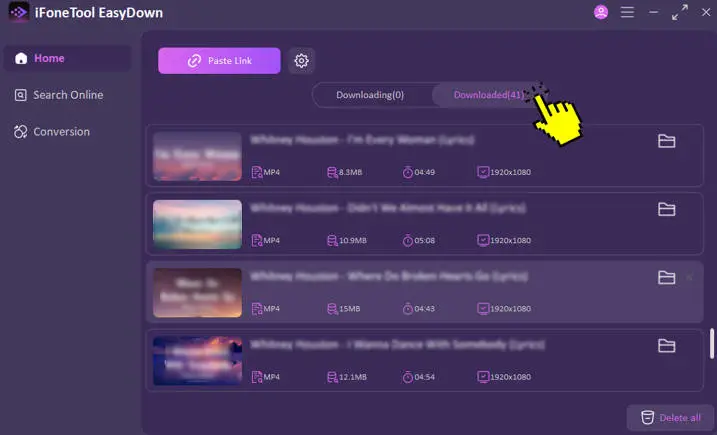
The entire process takes less than a minute, even for playlists with dozens of videos. This is the convenience that browser extensions simply can't match, and why I made the switch from extensions to EasyDown.
FAQs for YouTube to MP3 Converter Chrome Extension
Are these extensions safe?
Generally, yes, but they come with risks. Extensions often require broad permissions to "read and change all your data," and some, like Addoncrop, have a history of intrusive search ads.
Will the extension work with all browsers?
Not really. Most are built for Chrome, but they come with heavy baggage. For example, Video DownloadHelper requires Firefox or an extra "Companion App" to work on YouTube, and Tubly forces you into "Developer Mode.
Does the extension support high-quality MP3 downloads?
Yes, most extensions offer MP3 downloads up to 320kbps, but quality may vary depending on the extension and the video.
Do I need a YouTube Premium account to use this extension?
No, you don't need YouTube Premium to download MP3s with these extensions. You can download most public videos for free.

Stop gambling with sketchy extensions and settle for a tool that actually works. If you value your time and your music, EasyDown is the only solution you'll ever need. Download it for free and see the difference for yourself.
You may also like: